Back to Help Center
Seller Help Center
Find answers to your questions about selling Pokemon cards on Misprint, including fees, listings, payments, and more.
Popular Topics
Packaging Guidelines
Complete packaging guidelines for raw cards, graded slabs, and sealed products.
View GuidelinesSeller Requirements & Policy
Review complete seller guidelines, authenticity requirements, and platform policies.
View PolicyTax Reporting
Export your transaction history as a CSV file for easy tax preparation and record keeping.
Learn moreSeller Guides
Becoming a Seller on Misprint
To become a seller on Misprint, you need to apply for a seller account. Our application process helps ensure quality control and maintain trust in our marketplace.
Application Process
- Create a regular Misprint account if you don't already have one
- Go to the Become A Seller page
- Complete the application form with your information
- Accept the seller terms and conditions
- Submit your application for review
- Once approved (typically within 1-2 business days), you can start listing cards
Creating Listings
Creating detailed, accurate listings helps your cards sell faster and reduces the likelihood of returns or disputes.
How to Create a Listing
- Go to your Seller Dashboard
- Click on “Create Listing” or use our Scanner for graded cards
- Select the card from our database
- Specify the condition, grading (if applicable), and other details
- Take clear photos from multiple angles
- Set your asking price
- Review and publish your listing
Using the Order Book & Bid/Ask System
Misprint uses a bid/ask system similar to stock exchanges. This system allows for more efficient trading and better price discovery for Pokemon cards. You can view all of your current asks (listings) and manage incoming bids in the Order Book.
Selling Through Our Bid/Ask System
Creating an Ask
An “ask” is your listing price — what you're willing to sell your card for. Think of it like, what's your asking price! When you list a card, you're creating an ask in the system that buyers can purchase immediately.
Receiving Bids
Buyers can place bids below your asking price. You'll be notified of these bids and can choose to accept, decline, or wait for a better offer.
Selling Now
If there are existing buyer offers for your card, you can choose to “Sell Now” to the best offer, completing the transaction immediately.
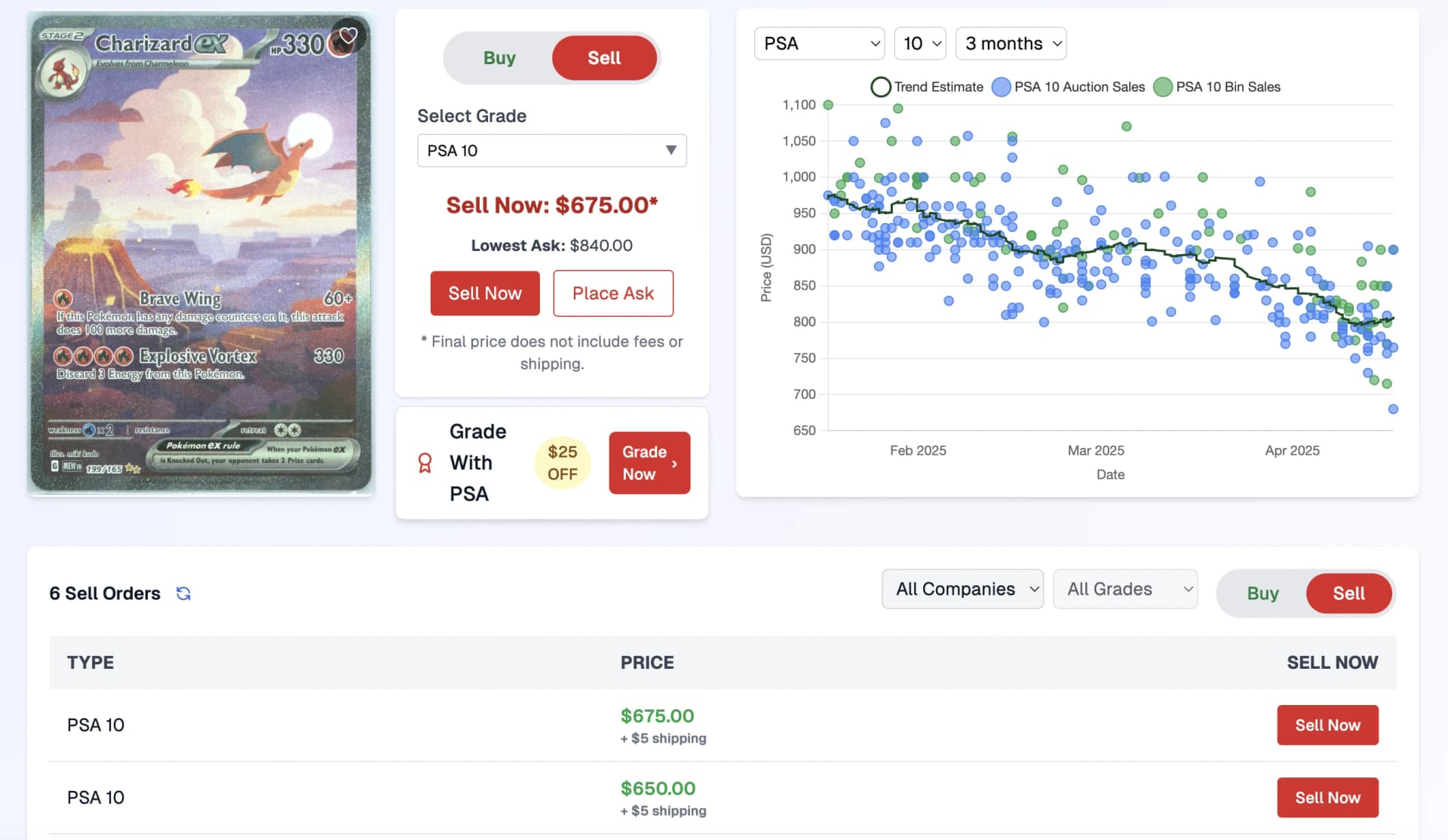
Click the image to view a live example of our bid/ask system
How Price Matching Works
The system automatically matches compatible bids and asks:
- If you list a card (create an ask) at or below an existing bid price, your card will automatically sell to the highest matching bidder.
- If a buyer places a bid at or above your asking price, your card will automatically sell to that bidder.
- The price chart helps you set competitive prices by showing recent sales trends.
Order Book Features
- Create an Ask: List your card at your desired price with options for PSA/BGS/CGC graded cards or raw/sealed products.
- Manage Active Listings: View and update your current asks, adjust prices, or remove listings.
- Review Offers: See all buyer offers on your cards and choose to accept or decline each one.
- Sell Now: View existing buyer offers for cards you own and sell immediately at the best offer price.
- Transaction History: Track all your completed sales, with detailed analytics on your performance.
Using the Card Scanner
Our Card Scanner allows you to quickly list PSA graded cards by scanning the label. This saves time and ensures accurate listings.
How to Use the Scanner
- Go to the Scanner page (we recommend using a mobile device and using this in app is best)
- Allow camera access when prompted
- Position the PSA labels within the scan area (you can scan more than one at a time!)
- The system will automatically detect and read the label information
- Verify the details and make any necessary adjustments
- Set your asking price and publish the listing
Cross-Listing to eBay
A Misprint Subscription includes automatic eBay cross-listing, so the same inventory can sit in front of both audiences without you managing two sets of listings.
How it works
- Connect your own eBay account from your seller profile. Nothing is listed until you turn syncing on.
- Choose what syncs — graded, ungraded and sealed listings, with an optional price range — and we show how many of your listings match first.
- Price and quantity changes push to eBay within a few minutes, and a sale on either marketplace removes the card from the other so you can't oversell.
- You fulfill eBay orders on eBay, under eBay's own policies, and eBay charges its own selling fees.
- If a card is already listed in your eBay store, syncing it creates a duplicate eBay listing — only sync cards that aren't on eBay yet.
Full details, including the first-week publishing pace, are in the Subscription FAQ.
Payments & Payouts
We process standard payouts on a regular schedule through your Stripe Connect account once an order is delivered. Seller Rewards can make your payouts faster — early (next business morning) at Tier 3 and same-day at Tier 4, when you ship with a Misprint label. Orders you ship with your own label pay on delivery.
Payout Process
- Payment Eligibility: Standard orders become eligible for payout after delivery; Early and Same-day reward tiers pay out on label generation, before delivery.
- Payout Speed: set by your Seller Rewards tier (Standard / Early / Same-day). It may take 1-4 business days for funds to arrive after release.
- Payment Method: Funds are transferred to your connected Stripe account, which you can set up in your Seller Profile.
- Balance Tracking: You can view your current balance and pending payouts in your Seller Dashboard.
Shipping Orders
Prompt and secure shipping is crucial for maintaining good seller ratings and customer satisfaction.
📦 Quick Packaging Reference
Raw Cards ≤ $50
Trackable letter OK
Raw Cards > $50
Bubble Mailer / Box Required
Graded Cards
Bubble Mailer / Box Required
Sealed Products
Box Required
Shipping Best Practices
- Shipping Timeline: Ship orders within 2 business days of purchase.
- Packaging: Follow our detailed packaging guidelines for each product type.
- Tracking: Always use tracking and enter the tracking number in the order management system.
- Insurance: Consider adding insurance for high-value cards. The shipping fee may not cover insurance for expensive items. Misprint is not responsible for lost or damaged items during shipping so insurance is highly recommended.
- Shipping Notifications: When you enter the tracking number, the buyer is automatically notified.
Adding Tracking Information
- Ship your order within 2 business days
- Go to your Order Management page
- Find the order in your “Sold Items” list
- Click “Add Tracking” and enter the tracking number and carrier
- The buyer will be automatically notified once tracking is added
⚠️ Tracking Enforcement Policy
To protect buyers, we automatically enforce tracking upload requirements. Please note:
- Warning: If tracking hasn't been uploaded 3 business days after the order, you'll receive a warning with the exact refund deadline.
- Auto-refund: If tracking is still not uploaded, the order is automatically refunded to the buyer 1 business day after the warning for Level 1 and 2 sellers, or 2 business days after it for Level 3 and above.
- Extension Option: After receiving the warning, you can request a one-time extension that adds 3 business days to your deadline.
Always upload tracking within 2 business days to avoid automatic order cancellation.
Shipping Fee Structure
Buyers pay a shipping fee that is passed on to you as the seller:
- One charge per order, set by the largest item in it — more items only raise it when they need a bigger package
- $2.50 — raw cards that fit an envelope: up to 30 cards and under $50
- $5.00 — graded cards, sealed packs, and raw orders past either of those bounds
- $10.00 — sealed boxes: booster boxes, elite trainer boxes, bundles, collections and cases
- Three graded cards in one package is $5.00, the same as one
Fee Structure
Misprint charges a 7% platform fee at Baseline — reduced to as low as 5% through Seller Rewards — plus a 3% + $0.30 payment processing fee (handled by Stripe). At Baseline this totals 10% + $0.30 per sale.
While shipping fees are passed on to you as the seller, please note that these fees are charged on the total transaction amount (including shipping). The platform fee and payment processing fees apply to both the item price and shipping fees.
Tax Reporting & Exports
Export your sales history as a CSV file for tax reporting purposes. This feature provides a detailed breakdown of all your completed transactions, including fees, shipping costs, and net payouts.
How to Export Your Data
- Go to your Order Management page
- Click the “Export” button in the header area
- Your browser will download a CSV file named
tax-export-YYYY-MM-DD.csv - Open the file in Excel, Google Sheets, or import into your tax software
What's Included
The export includes all completed transactions (both sales and purchases) with the following information:
Transaction Details:
- Transaction type (Purchase/Sale)
- Transaction date
- Card name and grading info
- Quantity sold
Financial Details:
- Item price and subtotal
- Shipping costs
- Platform and Stripe fees
- Sales tax collected from the buyer (remitted by Misprint, not by you)
- Net payout (your proceeds)
Additional Information:
- Cashback used (for purchases)
- Total paid (for purchases)
- Refund amount and date (if refunded)
Understanding the Sales Tax Column
Where this column shows an amount, Misprint collected that tax from the buyer and remits it as the marketplace. That portion is not yours to remit, and it is not deducted from your payout.
Where it shows $0.00, we did not collect any tax on that sale — because the destination has no sales tax, because the buyer is tax exempt, or because we are not collecting there. Whether anything is owed on those sales depends on your own circumstances, including where you have a tax presence, so please take a $0.00 row to your accountant rather than as confirmation that nothing is due.
Sales tax for sellers walks through what this means in practice — how nexus works, the one case most likely to affect you, and what to take to your accountant. Misprint does not provide tax, legal or accounting advice.
The column is still useful on your purchase rows, where tax you paid forms part of the cost basis of cards you bought.
Understanding Refunds in Your Export
For Sales: If an item was refunded, the Net Payout column will show $0.00 to reflect that you ultimately received nothing for that sale.
For Purchases: The Total Paid column shows your actual out-of-pocket cost after refunds (Original Amount - Refund Amount). If you used cashback and the refund exceeded what you paid, it will show $0.00 (cost basis cannot be negative for tax purposes).
Important Tax Information
This export is provided as a convenience for your tax reporting. Misprint is not a tax advisor. Please consult with a qualified tax professional or accountant to ensure you're reporting your income correctly according to your local tax laws.
Frequently Asked Questions
How do I increase my seller level?
Seller levels are based on the number of successfully completed orders. As you deliver more orders, you'll automatically advance to higher levels. See our Seller Levels page for specific requirements for each level.
What happens if a buyer wants to return an item?
If a buyer initiates a return, you'll receive a notification. Returns are only accepted for items that are damaged, inauthentic, or significantly not as described. You'll have the opportunity to review the buyer's claim and provide feedback before a determination is made. Check our Return Policy for full details.
Can I cancel a listing after it's published?
Yes, you can cancel any listing that hasn't been purchased yet. Go to your Order Book, find the listing, and click “Cancel Listing.”
How do I set up my Stripe account for payouts?
To receive payouts, you need to connect your Stripe account. Go to your Seller Profile, click on “Connect Stripe,” and follow the instructions to set up or connect your account. You'll need to complete Stripe's identity verification to receive payouts.
Still Need Help?
Contact Seller Support
Have a specific question about selling? Our seller support team is here to help!